TailSpend
Shared costs, settled simply.
Split expenses, keep group spending under control, and see who owes what. Built for trips, households, and the everyday costs you share.
Open TailSpend · Downloads · Publishing Consoles · Development
A Look Inside
A single view of your balances, with a separate currency and expense history for each group.
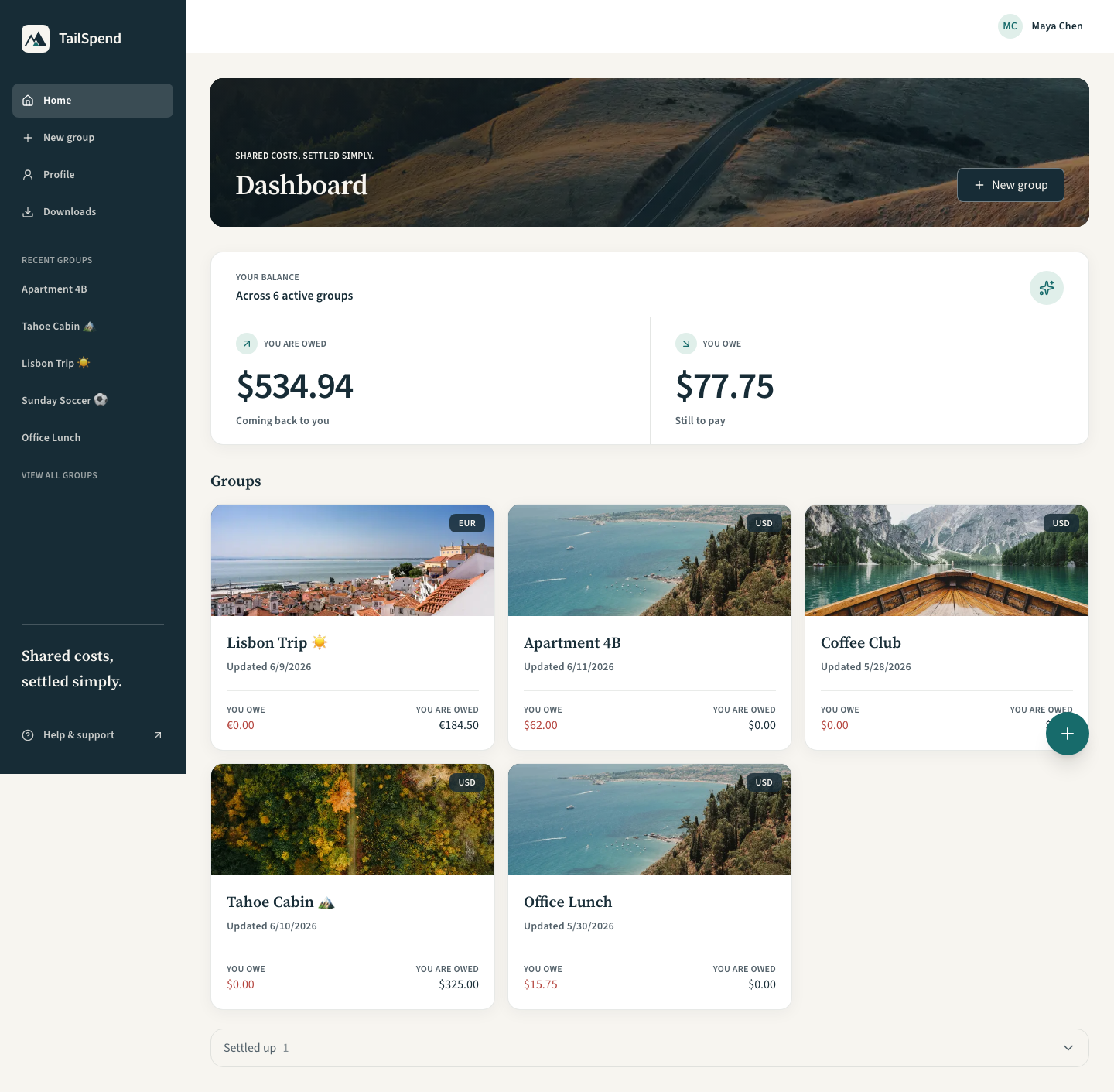
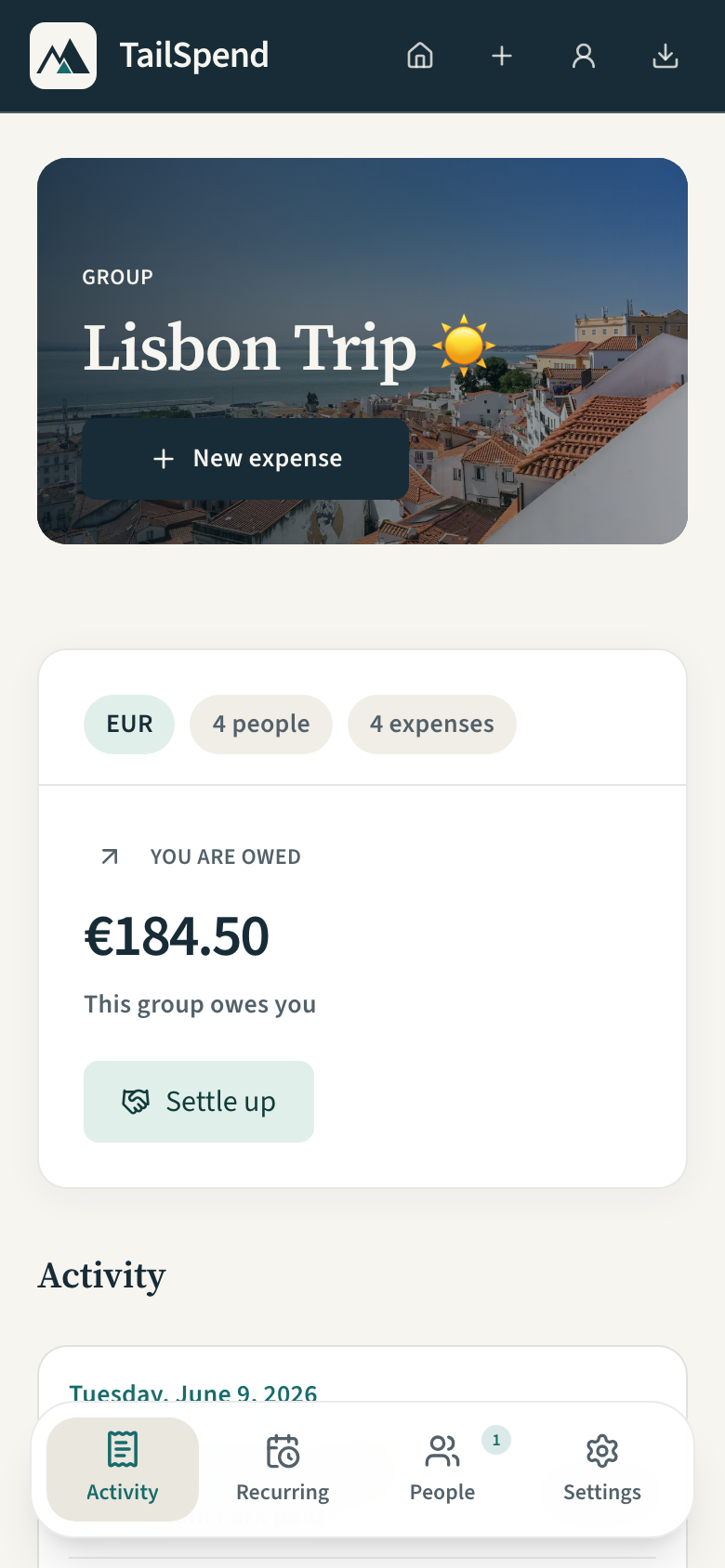 Keep the group in sync Expenses, balances, and group controls. |
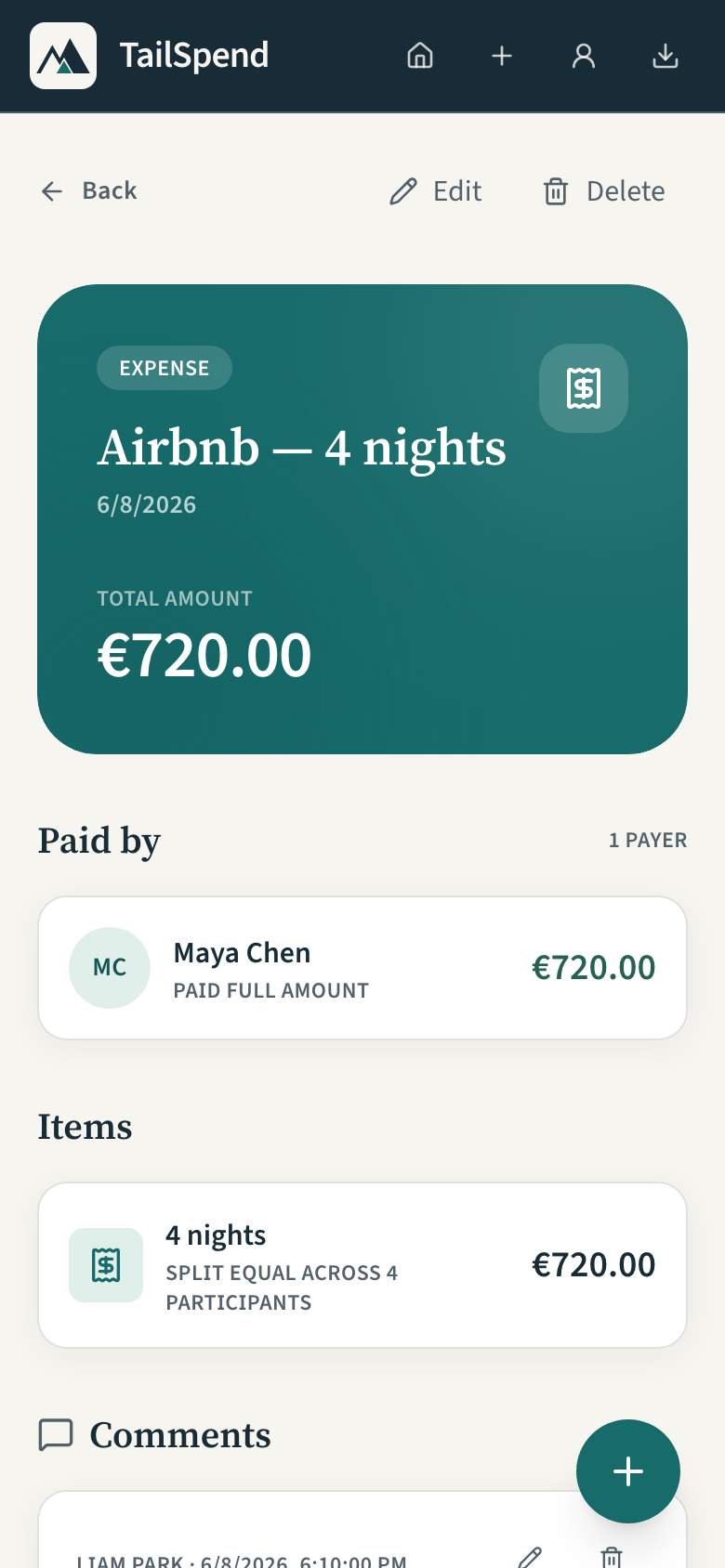 Know where every cost goes Payers, individual splits, and comments. |
Responsive web UI, captured on 1 October 2026 with deterministic demo data. Native iOS and Android clients also live in this repository.
Publishing & Operations
Developer access is required for the consoles below.
| Console | Use It For |
|---|---|
| Google Play Console | Android testing tracks, store listings, and production releases. |
| App Store Connect — TailSpend | iOS builds, TestFlight, store listings, and App Review. |
| Microsoft Partner Center — TailSpend | Windows packages, store listings, and certification. |
| Expo EAS — TailSpend | Native mobile builds and submission progress. |
| GitHub Actions | CI, deployments, and client release workflows. |
| AWS Console | API, authentication, storage, and infrastructure operations. |
For release instructions, see Mobile Releases and Desktop Releases. Client releases are coordinated by the Client Release workflow, which runs nightly and can also be triggered manually.
Getting Started
Use Node.js 24+ and npm. Run commands from the repository root unless noted otherwise.
npm install
npm run build
cp apps/web/.env.example apps/web/.env.local
Fill in the API and Cognito values in apps/web/.env.local for the stage you want to use, then start the web app:
npm run dev --workspace=web
Open localhost:3000. See Web Development for configuration and hosting details.
Mobile & Desktop
| Client | Start Locally | Setup |
|---|---|---|
| iOS / Android | npm run dev --workspace=mobile |
Mobile Guide: environment variables, Expo Go, and native builds. |
| macOS / Windows | npm run dev --workspace=desktop |
Desktop Guide: stage configuration and Electron development. |
For a connected iPhone, use npm run ios:device --workspace=mobile to install a native development build.
Common Commands
| Command | Purpose |
|---|---|
npm run dev |
Start workspace development servers. |
npm run build |
Build workspaces and generate API contracts. |
npm run check-types |
Check TypeScript across the repository. |
npm run test |
Run workspace tests. |
npm run lint |
Run lint, type, and workflow checks. |
Target one workspace with npm's --workspace flag:
npm run check-types --workspace=@repo/api-schema
npm run generate --workspace=@repo/openapi
npm run generate --workspace=@repo/api-client
Architecture
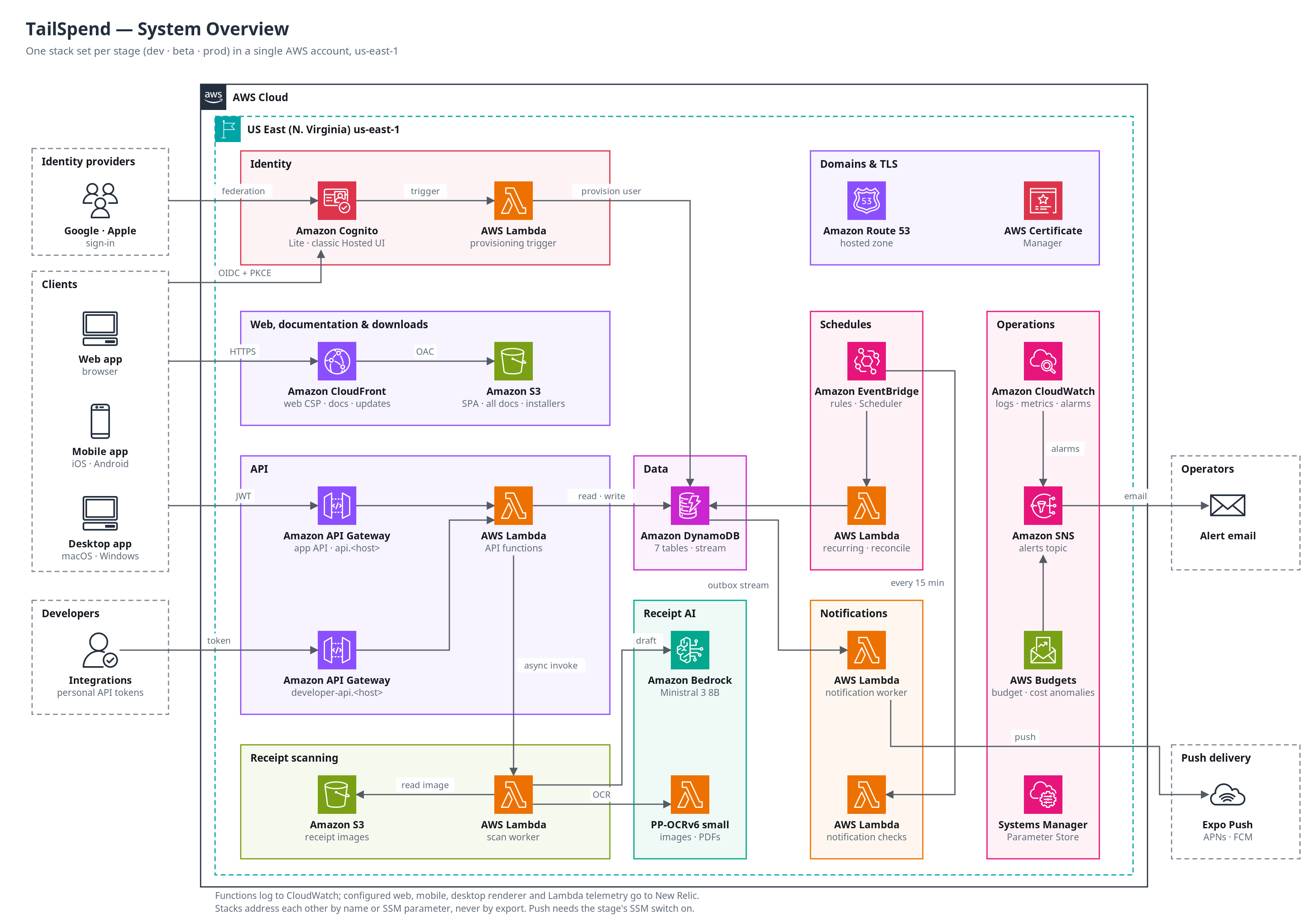
Each stage (dev, beta, prod) is its own set of CDK stacks in us-east-1. See Architecture for each component, Core API for request routing, and CI for how changes reach each stage.
Repository Map
TailSpend is a TypeScript monorepo managed with npm workspaces and Turborepo.
| Workspace | Responsibility |
|---|---|
apps/web |
Vite + React web app, hosted on CloudFront and S3. |
apps/mobile |
Expo + React Native clients for iOS and Android, built with EAS. |
apps/desktop |
Electron clients for macOS and Windows. |
apps/services |
Domain services and data repositories. |
apps/infra |
AWS CDK infrastructure for Cognito, API Gateway, Lambda, and DynamoDB. |
apps/web-e2e |
Playwright checks and responsive web screenshot capture. |
Shared packages keep the clients and services aligned:
- UI:
@repo/app-uishares the web and desktop application;@repo/design-tokenssupplies the shared visual theme. - Data:
@repo/api-schema,@repo/openapi, and@repo/api-clientdefine and generate the API contract.@repo/api-hooksprovides shared TanStack Query hooks. - Authentication:
@repo/auth-coreprovides platform-independent Cognito helpers, including PKCE and token refresh. - Tooling:
@repo/typescript-configand@repo/eslint-configprovide common project configuration.
Documentation is generated as static HTML from docs/ and the API contracts at docs.tailspend.kinesis.studio, hosted on CloudFront and S3. See Docs hosting.
API Contract
Edit Zod schemas in packages/api-schema/src, then run npm run build. The build generates OpenAPI for API Gateway and the typed client consumed by the apps. Generated artifacts are ignored by Git; edit the source schemas instead. Parse external payloads at API boundaries and pass typed values into services.
See the API Guide and Infrastructure Guide for contract generation and deployment commands.
Further Reading
- Mobile Development · Mobile Releases · Native UI Tests
- Desktop Development & Distribution · Web Hosting & Deployments
- Design System · Design Tokens
- Architecture · Core API · Architecture Diagrams
- Database Model · Receipt Scanning
- Observability (New Relic APM) · Cost Controls Runbook
Refresh the README Screenshots
The Playwright screenshot spec starts the web app locally, injects a demo session, and intercepts API requests with fixtures. No AWS credentials or deployed stage are needed.
To capture the three views used above:
npm run screenshots:mobile --workspace=web-e2e -- --grep 'group detail|expense detail|wide app and public page visual review'
Captures are written to docs/assets/web-phone/. The wide-screen test also captures other pages; review and commit only the images you intend to refresh. Update the capture date above when replacing the README images.
The landing page's native iOS screenshots have a separate capture process. Keep those native captures separate from these responsive web images.
Shared client logic is exported from @repo/api-hooks/logic; web and mobile adapters
keep their existing call signatures. Stage hosts and URL derivation live in
@repo/app-config. TypeScript workspace dependencies are pinned to 6.0.3, and the
shared vite.json preset covers web, desktop and app-ui. Expo retains its native
ESLint/TypeScript presets. All source workspaces have lint gates.
Deterministic screenshot, desktop-smoke and Maestro mock data lives in
@repo/test-fixtures. Its exported participant/group/expense IDs are also referenced
by Maestro YAML; update those together. Fixture-only changes stay excluded from
client release decisions. After capturing native marketing screenshots,
run npm run assets:marketing to regenerate the 512px WebP variants used by the web
and desktop pages. Original PNGs remain the native/store source images.
Desktop macOS release cleanup retains three installer versions per architecture and all live-feed references, only within that release's stage prefix. Dev, beta and prod are supported by the workflow stage input; no claim is made that a stage bucket currently contains releases. Website aliases and Store submissions are excluded. Old direct version URLs can stop working after pruning.
The API client lint gate excludes generated src/schema.d.ts; generation and
TypeScript validate that file. Handwritten client source is linted normally.